Clamp-On Desk Power Strips: Mounting and Ratings Compared
Compare six desk-edge clamp power strips by outlets, USB-C wattage, clamp thickness, cord length, joule rating and stated certification, using published specs.
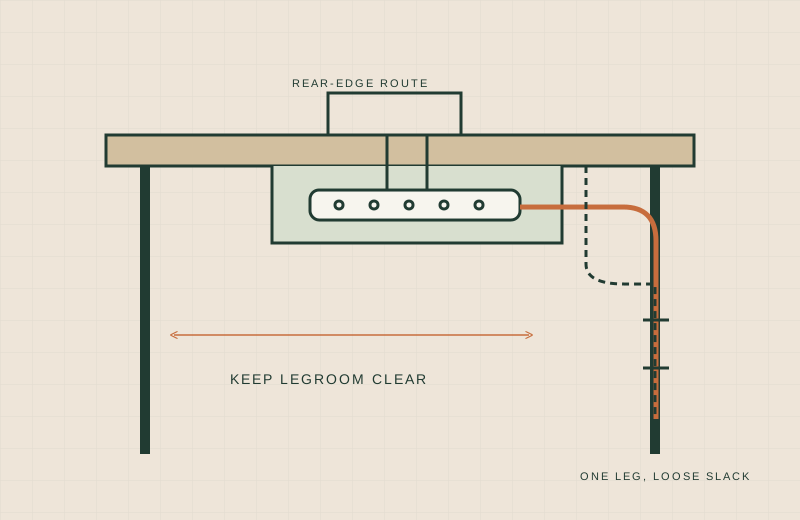
A power strip on the floor means reaching under the desk every time you plug in a charger, and a strip lying on a small desktop eats space you do not have. A strip that clamps to the desk edge puts outlets within reach and keeps the cord off the floor. The catch is that listings vary a lot in clamp range, USB wattage and what they say about certification.
We have not tested these power strips hands-on; this comparison is built from published specifications. Check the current listing and manual before buying.
Below are six clamp-mount strips with the numbers each page publishes. Where a number or certification is missing, the table says “not stated” rather than guessing. Availability was checked on Amazon.com on 18 November 2026 and can change.
What to measure first
Our guide to measuring a small desk covers the full method. For a clamp strip, these matter most:
- Edge thickness. Measure the desktop edge including any lip, banding or apron underneath. Compare it with the clamp range, not just the maximum.
- Gap behind the desk. Some listings ask for 0.4 to 0.5 inches between the desk and the wall so the body can sit behind the edge.
- Strip length and plug spacing. One of these is 13.6 inches long. Check that it fits your edge and that your chargers will not block neighbouring outlets.
- Cord route. Measure from the clamp spot to the wall outlet, then add slack for a standing desk’s full height range.
- What you will plug in. Add up the device ratings and compare them with the strip’s printed rating.
Comparison table
| Strip | AC outlets | USB ports and stated USB-C | Clamp thickness | Cord | Surge rating | Certification stated | Source |
|---|---|---|---|---|---|---|---|
| Eaton Tripp Lite TLP608DMUAM | 6 | 2 USB-A (2.4A shared), no USB-C | 0.4 to 1.38 in (see note) | 8 ft | 2100 J | UL Listed, cUL Listed, UL 1449, UL 1363 | Eaton datasheet |
| TESSAN 6 ft, 2100J | 5 | 2 USB-C (20W max) and 2 USB-A (12W max each) | Up to 2 in | 6 ft | 2100 J | Not stated | Amazon listing |
| Mifaso PD30W | 4 | 2 USB-C (one up to 30W PD, 18W combined when several ports are used) and 2 USB-A | 0.5 to 1.96 in | 5 ft | Not stated | Not stated | Amazon listing |
| PLUGTUL 3 outlet, PD 20W | 3 | 1 USB-C (20W) and 1 USB-A | Up to 1.72 in | 10 ft in title, 6 ft in a bullet | 980 J | Cord described as ETL listed | Amazon listing |
| VOGVAMSIN 6 AC, 1440J | 6 | 2 USB-C and 2 USB-A, 17W shared total | Up to 1.97 in | 6 ft | 1440 J | Not stated | Amazon listing |
| JXGUCAT 40W, 10 ft | 6 | 2 USB-C (20W each) and 4 USB-A | Up to 2.48 in | 10 ft | 1800 J | Not stated | Amazon listing |
Notes: the Tripp Lite datasheet gives the clamp range as 0.39 to 1.38 inches in its highlights and 0.4 to 1.6 inches in its body text, so confirm with the owner’s manual. The PLUGTUL listing gives two different cord lengths, so confirm before you rely on either. A “flame-retardant” material claim is not a safety certification, so we only list certifications the page names.
Per-strip notes
Eaton Tripp Lite TLP608DMUAM
The only one here with a manufacturer datasheet, which lists a 15A resettable breaker, 1875W output and a 400V UL 1449 let-through rating. It has no USB-C, only two USB-A ports sharing 2.4A.
- Worth shortlisting if you want a documented certification list and a stated joule rating, and phone charging over USB-A is enough.
- Skip if you need USB-C charging, or your desk edge is thicker than about 1.4 to 1.6 inches.
TESSAN 6 ft, 2100J
Five outlets, two USB-C ports at up to 20W each, and a clamp for edges up to 2 inches. The listing mentions overload, short-circuit and over-current protection but names no certification.
- Worth shortlisting if you want a high stated joule rating and a thicker clamp range.
- Skip if a named certification is a requirement for you.
Mifaso PD30W
The highest single USB-C figure in this group, 30W PD, but the listing says that port should be used alone for best speed and the total drops to 18W when several ports are in use. Its stated body size is 9.3 x 2.2 x 1.6 inches, which suits tight edges.
- Worth shortlisting if you want to charge a tablet or small laptop on one port and need a compact body.
- Skip if you want a joule rating or a named certification. Neither is stated.
PLUGTUL 3 outlet, PD 20W
Three outlets, one USB-C at 20W and 980 J. The ETL claim on the listing refers to the 14-gauge cord, not clearly to the whole strip.
- Worth shortlisting if you need only a few outlets and a flat plug, and your edge is under 1.72 inches.
- Skip if you need many outlets or a certification statement covering the whole product.
VOGVAMSIN 6 AC, 1440J
Six outlets in a three-sided layout with 2.3 inch spacing. The USB ports share 17W in total, so treat them as light charging.
- Worth shortlisting if outlets matter more than USB speed.
- Skip if you want fast USB-C or a named certification.
JXGUCAT 40W, 10 ft
The widest clamp here at 2.48 inches, a 10 ft cord and 1800 J. Its listing says 40W is the total output and each USB-C port is 20W at most.
- Worth shortlisting if your desk is thick, or the wall outlet is far away.
- Skip if you want a stated certification or a 20W-plus single port.
Safety basics
These are general habits, not installation instructions. Follow each manufacturer’s manual and printed rating.
- Use the strip only within its printed rating, including total wattage.
- Do not plug one power strip into another.
- Do not cover the strip or trap heat around it with fabric, boxes or enclosed shelves.
- On a standing desk, run the full height range and check that the cord never pinches, stretches or catches.
- Replace a strip with a damaged cord or housing.
- These are plug-in products. Do not hardwire anything.
We make no claim that any product is safe beyond the certifications its page states.
When a clamp strip is the wrong choice
- Your desk edge is outside the clamp range, or has a lip, drawer or crossbar blocking the clamp.
- You have a glass or fragile top that cannot take clamp pressure.
- You need a strip for high-draw equipment. Check the equipment rating first.
- You want everything hidden. A tray is better; see our clamp-on cable tray comparison.
For routes that avoid screws, see no-drill cable management.
What not to buy
- A strip with no stated clamp thickness range.
- Anything where the listing gives conflicting cord lengths and you cannot confirm which is right.
- A strip whose USB wattage is a combined figure when you expected a full figure per port.
- Anything you plan to chain through another strip.
Sources
- Eaton Tripp Lite TLP608DMUAM datasheet: https://resources.ampheo.com/static/datasheets/tripp-lite-by-eaton/tlp608dmuam.pdf
- Eaton product page: https://www.eaton.com/us/en-us/skuPage.TLP608DMUAM.html
- TESSAN, Amazon listing: https://www.amazon.com/dp/B0FB331YBC
- Mifaso PD30W, Amazon listing: https://www.amazon.com/dp/B0DCZFXDDS
- PLUGTUL, Amazon listing: https://www.amazon.com/dp/B0CPDYH4XV
- VOGVAMSIN, Amazon listing: https://www.amazon.com/dp/B0GH6TT619
- JXGUCAT, Amazon listing: https://www.amazon.com/dp/B0DGTH682Y