Monitor Arm vs Riser: How to Decide for a Small Desk
Compare a monitor arm and a stand riser using your desk measurements, mounting surface and monitor specs, plus when to wait before buying either.
This is a research-based guide, not a hands-on product test. It uses published workstation guidance and manufacturer documentation to help you choose an approach, and it does not recommend specific products.
Both a monitor arm and a riser aim to put the screen where you can see it comfortably. They get there in different ways, and each has conditions where it is the wrong choice.
What you are trying to achieve
OSHA’s monitor guidance gives the goals: the screen directly in front of you, the top line at or below eye level, a general eye-to-screen distance of 20 to 40 inches, and the screen perpendicular to windows to limit glare. Those are goals for any setup. Neither an arm nor a riser is required to meet them.
How the two options differ
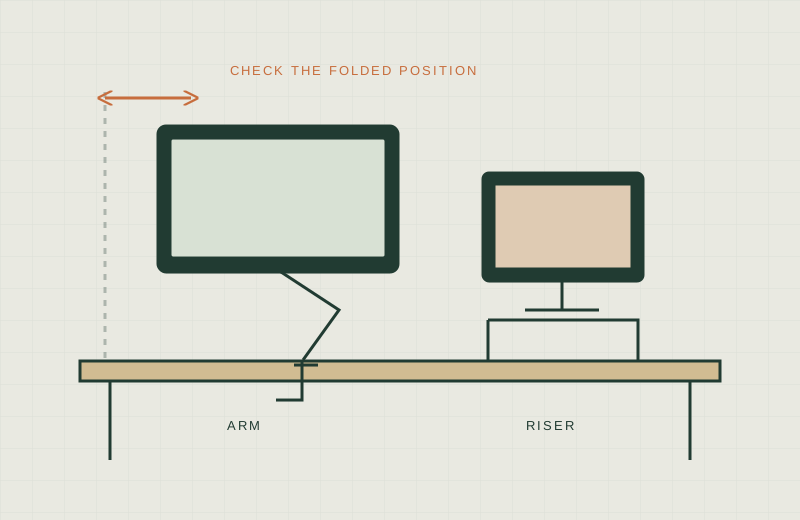
A riser lifts the monitor or laptop on a platform that rests on the desk. Nothing attaches to the desk. It keeps the monitor’s base footprint, and it can add shelf space underneath. It generally adds height but little or no depth adjustment, so the screen stays roughly where the base sits.
An arm attaches to the desk, typically by clamp or grommet, and holds the monitor through a VESA pattern on its back. It can free the surface and offers more adjustment of height, tilt and reach. In exchange, it depends on the desk surviving the mount, on the monitor having a compatible VESA pattern, and on enough room behind the monitor to move.
Questions that decide it
- Can your desk take a mount? Manufacturers specify desktop thickness ranges and surface conditions. Glass, hollow-core, thin or damaged tops may be outside them. Check the exact model’s installation guide. No clamp is universally safe.
- Does your monitor have VESA holes? Check the pattern, the recess depth, and the monitor weight without its stand. Adapters add their own fit questions.
- Is there a wall behind the desk? Arms need movement room. See Monitor Arm Wall Clearance.
- Do you need depth adjustment? If you often move the screen closer or farther, check that the specific arm offers the reach adjustment you need; a simple riser generally does not.
- Do you rent or share the desk? A riser needs no clamp or mounting hole and is easy to move, but check the feet and surface finish for possible marking.
Checklist
- Desk measured using How to Measure a Small Desk
- Desktop material and thickness confirmed
- Monitor VESA pattern and stand-free weight written down
- Manufacturer limits for the specific model read, including load and reach
- Seated eye height compared with the monitor’s top edge
- Riser footprint compared with usable depth, with room left for a keyboard
- Return policy and installation steps reviewed before purchase
What not to buy
- An arm for a monitor without VESA holes, unless the manufacturer documents an adapter for that exact combination.
- A riser that pushes the screen above eye level. OSHA notes that a monitor placed too high forces the head and neck back.
- Any mount judged only by its listed screen-size range. Weight, VESA and desk condition matter as much.
- A mount for a glass or hollow-core desk without explicit manufacturer approval for that surface.
When to defer
Wait if you do not know the desktop construction, if the monitor’s mounting specs are unknown, or if the desk is likely to be replaced soon. In the meantime, OSHA describes a temporary way to adjust height and tilt using stable items already on hand, though tilting a screen back can create glare from overhead lights.
A practical order
Measure first, confirm the surface, check the monitor, then compare manufacturer documents. Manufacturer category pages such as Ergotron’s desk mounts are useful for seeing what kinds of mounts exist, but the individual model page controls compatibility. This guide has not tested any of them.
For cords once the screen is placed, see No-Drill Cable Management.
Sources
- OSHA eTools: Computer Workstations, Monitors
- OSHA eTools: Computer Workstations, Desks
- Ergotron: Desk Mounts category (manufacturer product category; check the specific model page and installation guide)
- Eureka Ergonomic: Monitor arm desk depth, measure before you mount (manufacturer blog; treat as one vendor perspective)